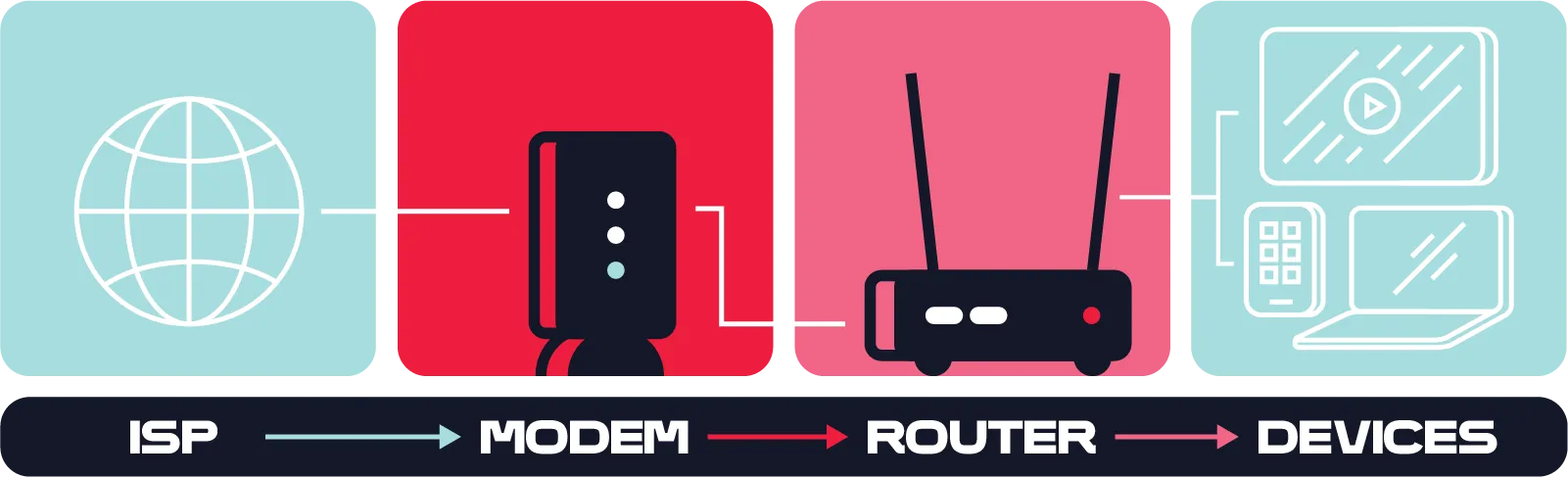
Because some people use the terms interchangeably, it can be confusing to distinguish between a modem and a router. Clarifying these differences can help you feel more confident when managing your home network and making upgrade decisions.
The simple explanation: A modem connects your home to your internet service provider (ISP); a router distributes that internet connection to your computers, phones, and other connected devices.
For a more in-depth explanation, continue reading. We'll explain what a modem is, what a router does, compare the two in a side-by-side table, and help you feel empowered to choose the best internet setup for your home.
A modem is a device that translates your ISP’s signal into a format your home network can use.
So, what does a modem do? It receives the signal from your internet service provider (ISP), converting it into a signal your devices can access through your home network. All internet traffic enters your home through the modem before reaching your connected devices. Without a modem, your home can't communicate with your ISP, so none of your devices can access the internet.
The type of modem you need depends on the type of internet service you have. Common options include:
Even if your modem still works, older equipment can limit your internet experience. You may want to upgrade your modem if you notice:
Some internet providers include a modem as part of your monthly service, while others let you use your own compatible equipment. Renting can simplify setup and support, while owning a modem may save money over time. Before purchasing your own device, make sure it's compatible with your ISP and internet plan.
A router is a device that creates a local network in your home, allowing multiple devices to share a single internet connection wirelessly or through Ethernet cables.
So, what does a router do? Once your modem receives an internet connection from your ISP, the router distributes that connection to the devices throughout your home. A Wi-Fi router allows phones, laptops, tablets, smart TVs, gaming consoles, smart speakers, and other connected devices to access the internet at the same time.
In most home internet setups, a router does not connect directly to your ISP. Instead, it connects to your modem, which brings the internet into your home. The router then creates your home network, managing how connected devices communicate with each other and access the internet.
A router performs several important functions to keep your home network running smoothly:
Because your router plays such an important role in your home network, its capabilities can significantly impact your online experience. A newer router can support faster Wi-Fi standards, connect more devices efficiently, and provide better coverage throughout your home.
If your Wi-Fi isn't performing the way you'd like, your router could be the reason. Consider upgrading if you notice:
Upgrading your router can improve Wi-Fi coverage, support more connected devices, and help you get the most from your internet plan.
The difference between a modem and a router comes down to their roles in your home internet setup. A modem connects your home to the internet via your ISP, while a router shares that connection with your wired and wireless devices. In most homes, both devices work together to provide reliable internet access.
 |  | |
Feature | Modem | Router |
Primary purpose | Connects your home to your ISP | Creates and manages your home network |
Internet connection | Receives internet service from your ISP | Shares the modem's internet connection with your devices |
Main function | Translates your ISP's signal into usable internet access | Directs internet traffic between connected devices |
Device connections | Typically connects to one router or a single device | Connects multiple devices through Wi-Fi and Ethernet |
Wi-Fi capability | Usually does not provide Wi-Fi on its own | Provides Wi-Fi for phones, laptops, smart TVs, gaming consoles, and more |
Can access the internet by itself | Yes, but typically only for one connected device | No, it usually requires a modem to access the internet |
A modem and router each have a specific job, but they're designed to work as a team.
Here's what happens in a typical home network:
Without a modem, your home can't connect to the internet. Without a router, you may only be able to connect a single device directly to the modem, rather than sharing the connection throughout your home.
For most home internet setups, the answer is yes.
If your ISP provides separate equipment, you'll need both a modem to receive internet service and a router to create your home network. Some providers offer a modem-router combo that performs both functions in a single device.
A modem-router combo combines both devices into one unit, making setup simpler and reducing the number of devices you need.
Pros | Cons |
Easier installation with fewer cables | No independent upgrades to modem or router |
Takes up less space | Fewer advanced networking features |
One device to manage and restart | Must replace entire unit when either function fails |
Often included with internet service | Generally less flexibility |
Having a combined modem and router can also make troubleshooting more difficult.
If you're having internet problems, identifying the symptoms can help you determine whether your modem or router is the likely cause.
Understanding this modem vs. router comparison can make troubleshooting much easier and help you decide whether it's time to replace your modem, upgrade your router, or simply adjust your home network setup.
The best home network setup depends on how you use the internet, how many devices you connect, and the size of your living space. Here are a few common scenarios to help you decide what setup makes the most sense:
A modem-router combo may be all you need if you have a modest number of connected devices and don't require advanced networking features.
Separate modem and router devices can provide better Wi-Fi coverage and handle dozens of connected devices, from smartphones and laptops to security cameras and smart TVs.
A high-performance router with the latest Wi-Fi technology can help reduce lag, improve wireless performance, and support bandwidth-intensive activities like 4K streaming and online gaming.
If your work depends on a reliable connection or your home includes many smart devices, investing in a modern router can improve stability, security, and overall network performance.
A modem-router combo is a great option if you want a simple setup with fewer devices to manage. It's often ideal for smaller households or anyone looking for an easy installation.
Separate devices are typically the better choice if you:
No matter which option you choose, make sure your equipment is compatible with your ISP and supports the speeds included in your internet plan. If you're upgrading to a faster plan or adding more connected devices, newer networking equipment can help you get the performance you're paying for.
Whether you're replacing outdated equipment, improving your Wi-Fi coverage, or signing up for new internet service, the right networking setup can make a noticeable difference in your online experience.
Ready to upgrade your home network? Explore Frontier internet plans, shop for compatible networking equipment, or contact a Frontier expert to find the right solution for your home.